
Mental Health Screening
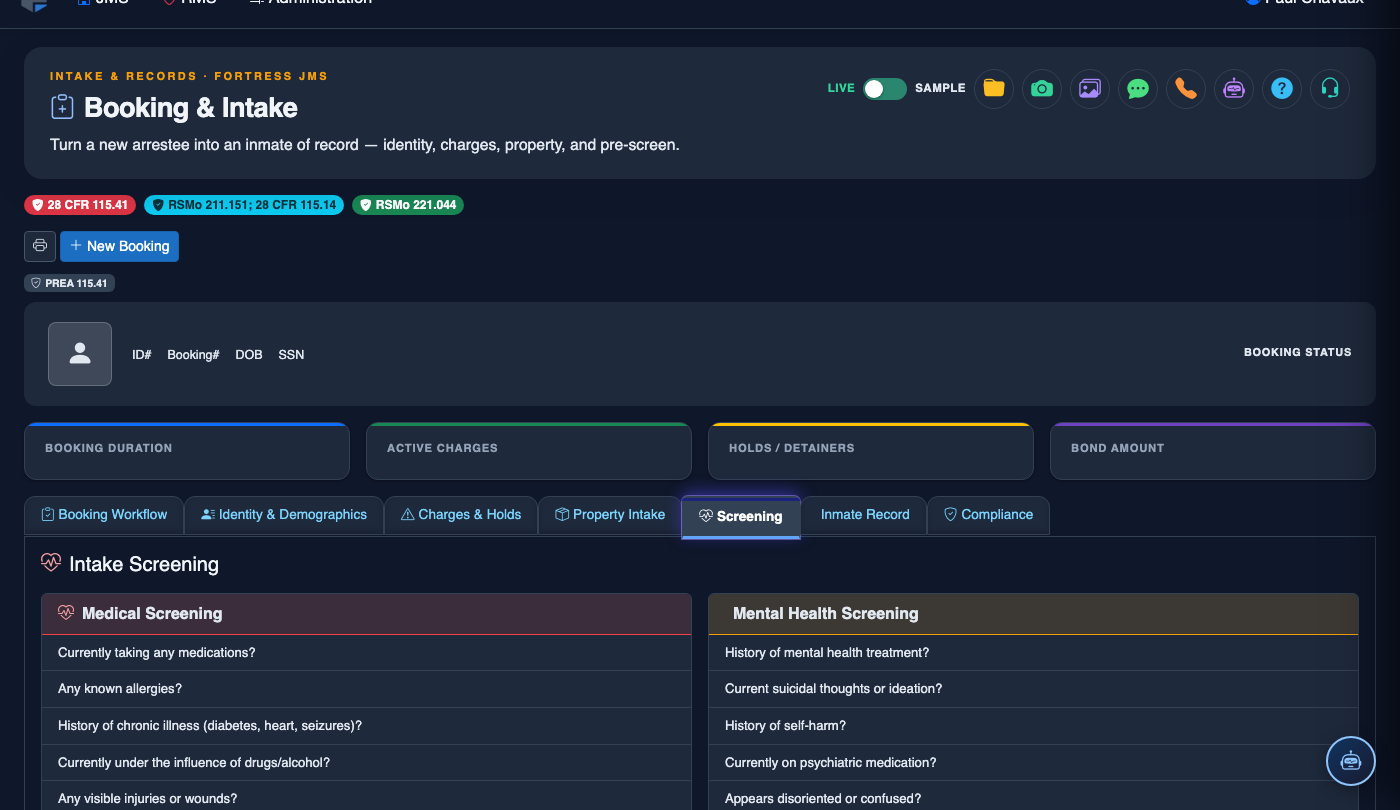
The Mental Health Screening tab provides a structured assessment tool for identifying inmates who may require psychological evaluation, crisis intervention, or enhanced supervision. By capturing suicide risk indicators, psychiatric history, and behavioral observations at intake, facilities can ensure appropriate housing assignments and care plans are in place from day one.
Suicide Risk Assessment
Standardized screening questions to identify inmates at risk of self-harm and trigger appropriate watch protocols.
Psychiatric History
Record prior psychiatric hospitalizations, diagnoses, and current mental health treatment providers.
Behavioral Observations
Officers document observable behaviors such as disorientation, agitation, or signs of intoxication during intake.
Crisis Intervention Triggers
Automatic alerts notify mental health staff when screening results meet crisis intervention thresholds.
Step-by-Step: Conducting Mental Health Screening
Open the Mental Health Screening Tab
Navigate to the Mental Health Screening tab (Tab 5) in the booking intake screen. This screening should be conducted in a private setting when possible. Note the inmate’s demeanor, eye contact, and responsiveness before beginning the formal questionnaire.
Administer the Suicide Risk Questionnaire
Read each Suicide Risk question verbatim to the inmate and record their responses. Questions cover current suicidal ideation, prior attempts, access to means, and hopelessness indicators. The system automatically calculates a Risk Score based on responses.
Record Psychiatric History
In the Psychiatric History section, document any prior psychiatric hospitalizations, diagnoses (depression, bipolar disorder, schizophrenia, etc.), and current psychiatric medications. Enter the name and contact information of any current Mental Health Provider for follow-up coordination.
Log Behavioral Observations
In the Officer Observations section, select all applicable behavioral indicators observed during intake: Disoriented, Agitated, Crying/Tearful, Appears Intoxicated, Unresponsive, or Threatening. Add a free-text narrative to describe specific behaviors in detail.
Review Automated Risk Classification
After completing all sections, review the system-generated Mental Health Risk Level (Low / Moderate / High). High-risk results automatically generate a mental health referral and may restrict housing options. Review the recommendation and confirm or escalate as appropriate.
Assign Watch Level if Required
If the risk score warrants enhanced supervision, use the Assign Watch Level dropdown to set 15-Minute Checks, Constant Supervision, or Crisis Watch. The selected watch level is automatically communicated to housing officers and appears prominently on the inmate’s housing dashboard.
Save and Notify Mental Health Staff
Click Save Mental Health Screening. If a referral was generated, verify it appears in the mental health staff’s task queue. Document the screening completion time — many jurisdictions have mandated timeframes for completing mental health intake screenings.
💡 Pro Tips
- Never skip the suicide risk questions even if the inmate appears calm — situational stress at booking creates elevated risk regardless of outward presentation.
- If an inmate refuses to answer questions, document the refusal as a response. Refusal itself may be a clinical indicator and should be communicated to mental health staff.
- The Mental Health Screening record integrates with the classification module — High risk scores automatically restrict certain housing assignments until cleared by a clinician.