
Medical & Screening
The Medical & Screening module gives correctional health staff, nurses, and booking officers a unified platform to manage every aspect of inmate healthcare from intake to release. From the initial health screening at booking through daily sick-call triage, medication administration records (MAR), and chronic care management, the module ensures every clinical action is documented, tracked, and audit-ready to meet state and federal correctional healthcare standards.
Intake Health Screening
Capture vital signs, communicable disease screening, mental health flags, and medical history at the point of booking.
Sick Call Queue
Manage inmate medical requests, triage urgency, schedule nursing assessments, and document provider visits all in one queue.
Medication Administration
Track prescribed medications, administration schedules, refusals, and pharmacy orders with a full MAR for each inmate.
Mental Health Alerts
Flag inmates with active mental health concerns so housing officers and medical staff are immediately notified of watch requirements.
Clinical Documentation
Generate SOAP notes, treatment plans, referral orders, and medical holds directly tied to the inmate’s custody record.
Compliance Reporting
Produce ACA, NCCHC, and state-mandated healthcare reports with a single export, pulling data directly from the clinical record.
Step-by-Step: Medical & Screening Workflow
Access the Medical & Screening Module
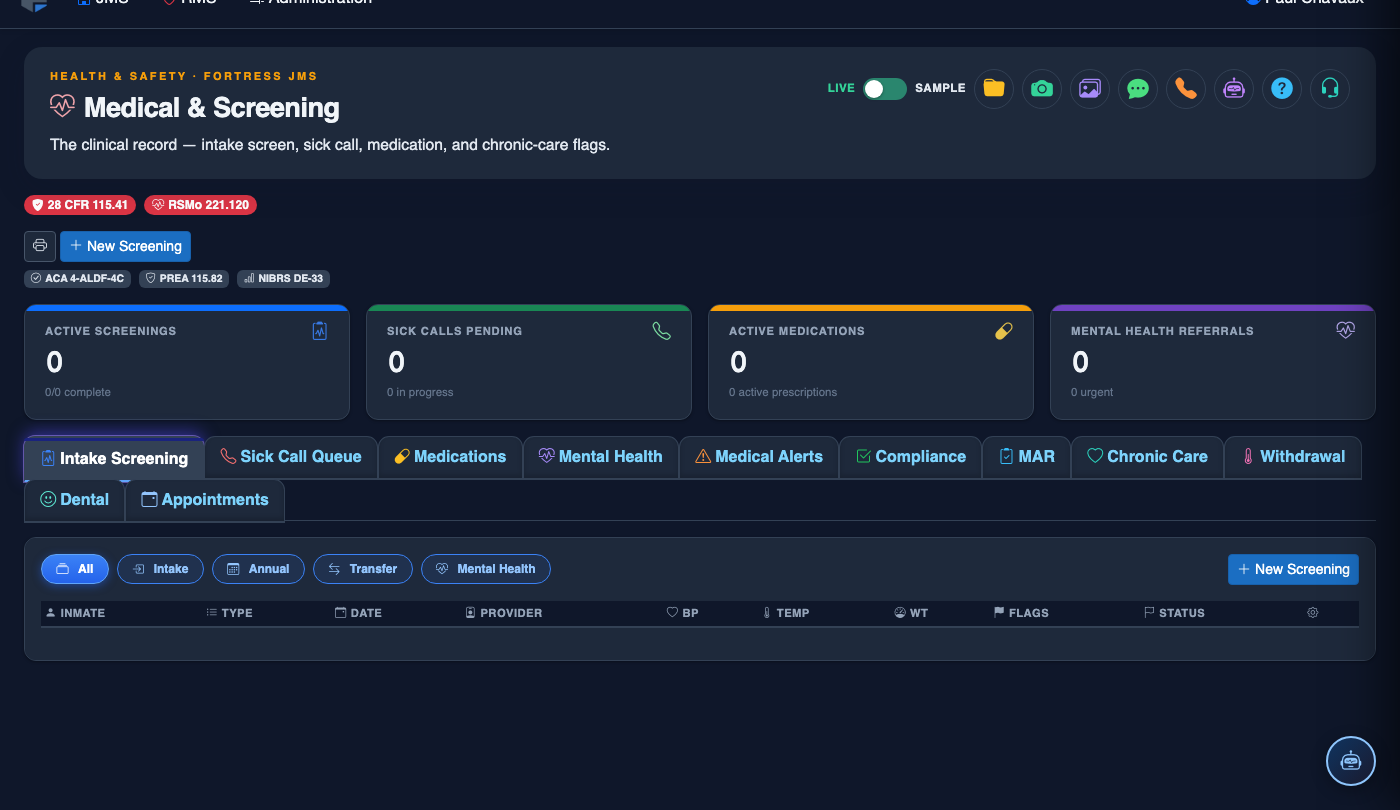
From the FortressDMS main navigation, click Medical & Screening. The module dashboard displays a daily summary: pending intake screenings, active sick-call requests, medications due this shift, and any open mental health alerts requiring immediate attention.
Complete a New Intake Screening
When a new booking is created, an Intake Screening task is automatically queued. Click the inmate’s name in the pending screenings list and work through the structured assessment: vital signs, medical history, current medications, communicable disease screening questions, mental health indicators, and suicide risk assessment. All fields are required before the screening can be marked complete.
Triage the Sick-Call Queue
Click the Sick Call Queue tab to see all open inmate medical requests. Each request shows the submitted complaint and the time elapsed since submission. Use the Triage button to assign a priority level (Emergent, Urgent, Routine) and schedule a nursing assessment or provider visit. The system enforces response time thresholds based on priority level.
Manage the Medication Administration Record (MAR)
Navigate to the Medications tab to view all active prescriptions for the current housing unit or facility-wide. For each medication pass, confirm administration by clicking Given or document a Refusal with the reason. The MAR timestamps every entry with the administering nurse’s credentials and prevents duplicate administration within the medication window.
Place a Medical Hold on an Inmate
When an inmate requires medical observation before classification or housing, click Place Medical Hold from the inmate’s medical record. Enter the Hold Reason, Duration, and responsible clinician. The hold automatically blocks the inmate from general population housing assignment and notifies classification staff of the pending clearance requirement.
Document Clinical Notes and Referrals
From any inmate’s medical record, click Add Clinical Note to document a SOAP-format progress note. Use Create Referral to initiate an outside specialist referral or hospital transport request, which is automatically routed to the transport coordinator in the Inmate Movement module for scheduling.
Generate Compliance Reports
Click Reports in the module header to access pre-built compliance report templates including the Sick Call Response Time Report, Medication Refusal Log, Mental Health Caseload Summary, and Intake Screening Completion Rate. All reports can be exported as PDF or CSV for submission to accreditation bodies.
💡 Pro Tips
- Configure the Medication Alert threshold in module settings so nurses receive an on-screen prompt when a medication pass window is within 30 minutes — this prevents missed administration events that create audit findings.
- The intake screening form auto-populates the inmate’s name and booking number from the booking record — never manually type these fields, as discrepancies between the medical and custody record can complicate legal discovery.
- Use the Mental Health Watch flag liberally at intake; it is far easier to downgrade a watch after a clinical evaluation than to defend a gap in observation after an adverse event.